
Vantage
❋
Re-evaluation of initial product assumptions under time pressure
Qevlar AI | 2026
Qevlar AI is an autonomous AI Security Operations Center (SOC) that helps security teams investigate and respond to cyber threats at scale. It autonomously analyzes alerts, gathers relevant context, and delivers evidence-based verdicts and recommended actions.
By taking over repetitive investigation work, Qevlar helps security analysts reduce alert fatigue, respond faster, and focus on more strategic security work.
Vantage was a new feature created to help security teams spot when someone might be trying to break into a user account. It analyzes login activity to identify unusual patterns. The feature needed to fit naturally into Qevlar’s existing investigation tools and help users understand what was happening and decide whether action was needed.
I joined the project at a later stage, when most of the technical research had already been completed by data analysts and the PM had built an early concept. On top of that, the project had a very tight deadline, requiring me to find creative ways to move forward quickly while still making thoughtful design decisions.
The project & the challenge
My role
I was the product designer responsible for Vantage, but joining the project at a later stage, with the research already considered as completed and an early concept built by the PM. My responsibility therefore was to review the existing research and solution, challenge its assumptions, and turn it into a clear, useful experience for security investigators.
This included refining the information structure, deciding how Vantage should fit into the investigation flow, and translating complex analytical findings into something that could be easily understood and acted on quickly. I also had to prepare the complete user flow, including edge cases and interactions, for developer handoff - all within one week.
Preparing project strategy
I joined the project late in the process, when the PM had already created a prototype and wanted me “just to beautify it.”
Before focusing on aesthetics, I wanted to make sure we were solving the right problem - and, if necessary, challenge the direction we were taking.
I only had a few days before the deadline to hand in the final spec, so I created a plan adapted to the situation:
Learn - review all available documentation on Vantage, including why the project was chosen and what is expected from it.
Benchmark - look at how our competitors approach the problem, conducting a quick review of the top five competitors.
Research - there won’t be enough time to speak directly with clients, so I would dive into our archives of client call transcripts and user testing sessions.
Analyse the PM’s proposition - once I have a solid understanding of the context and user needs, I would analyse the solution proposed by the PM to assess whether it addresses those needs.
PM alignment - Based on my findings, I will align with the PM on the solution direction and discuss whether any changes are needed. This will become a pivotal moment in the project - more on that below.
Solution spec - finally, I would prepare the solution specification to hand over to the development team.
Leveraging AI to benchmark and analyse faster



With no time to properly contact and interview our users, my best bet was to look for mentions of logins (needs, wishes, frustrations…) in the existing user interview database in Notion.
Every Notion record was also connected to its corresponding Granola file, which contained an AI-generated transcript of the full conversation. I connected all three tools - Notion, Granola, and Claude - and prompted Claude to analyse the transcripts and identify relevant insights around login-related issues.
Similarly, by prompting Claude and using its research feature, I was able to benchmark our top five competitors fast and compare how they approached failed login attempts - whether they surfaced this information at all, and how they presented it in their products.
Analysing the initial solution
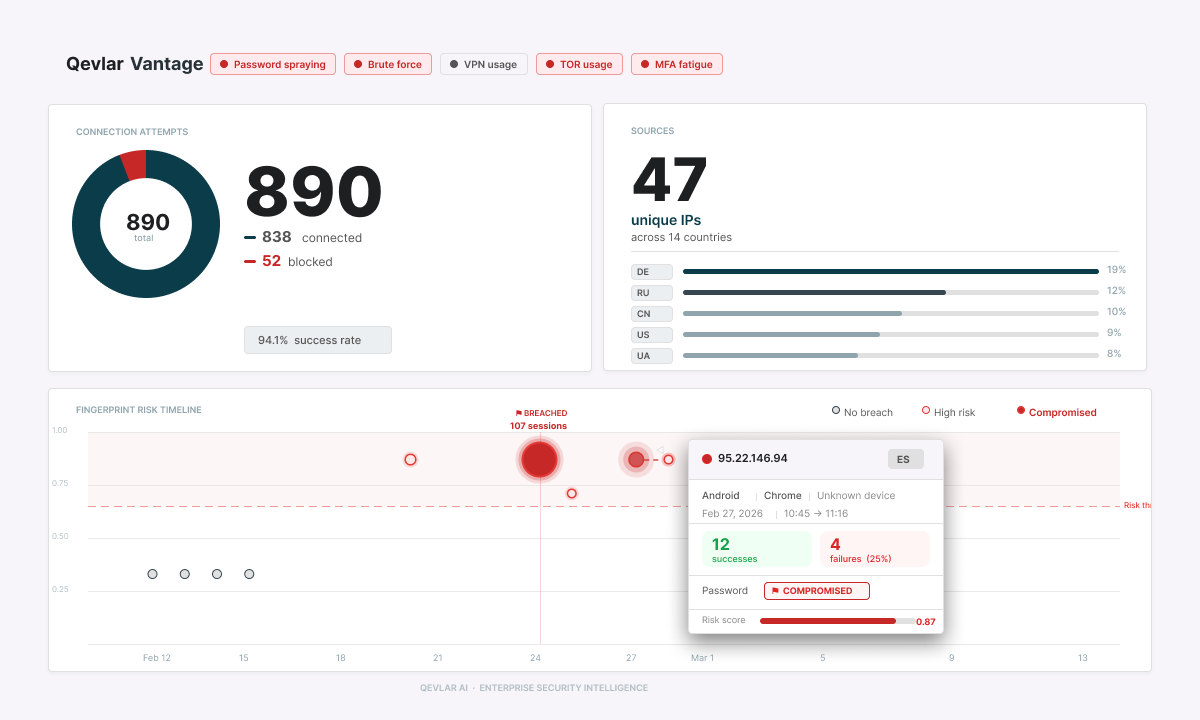
Snapshot of the initial solutionThe next step was to analyse the solution that the team had come up with without me:
Did it address the user needs?
Did it solve the known pain points?
Was it the best solution we could come up with?
The short answer was no.
There were several issues with the design that I identified. The main ones were:
The screen contained a lot of data, but it didn’t tell a logical story.
Some of the data shown was not practically useful to an investigator, while some important information was missing.
The team planned to put this feature somewhere that wasn’t part of the expected user flow, so it was likely to be overlooked.
I needed to challenge the initial solution and convince the team to change course.
Challenging the direction - a workshop
At this point, I could only get a limited amount of the PM’s time. The most important thing was to clearly explain my reasoning and get his buy-in.
I decided to run a workshop with two main goals:
Help the PM better understand the user needs
Co-create a better solution
Workshop approach
1. Map the journey
Sketch the investigator’s journey when handling a suspicious login alert, based on research findings, past client calls, and the PM’s experience as a former SOC analyst.
2. Identify gaps
Analyse the journey to uncover key needs and pain points, then compare it with the initial solution to identify missed opportunities.
3. Design the improved flow
Translate the findings into a user flow that supports the investigator at each stage of the investigation.
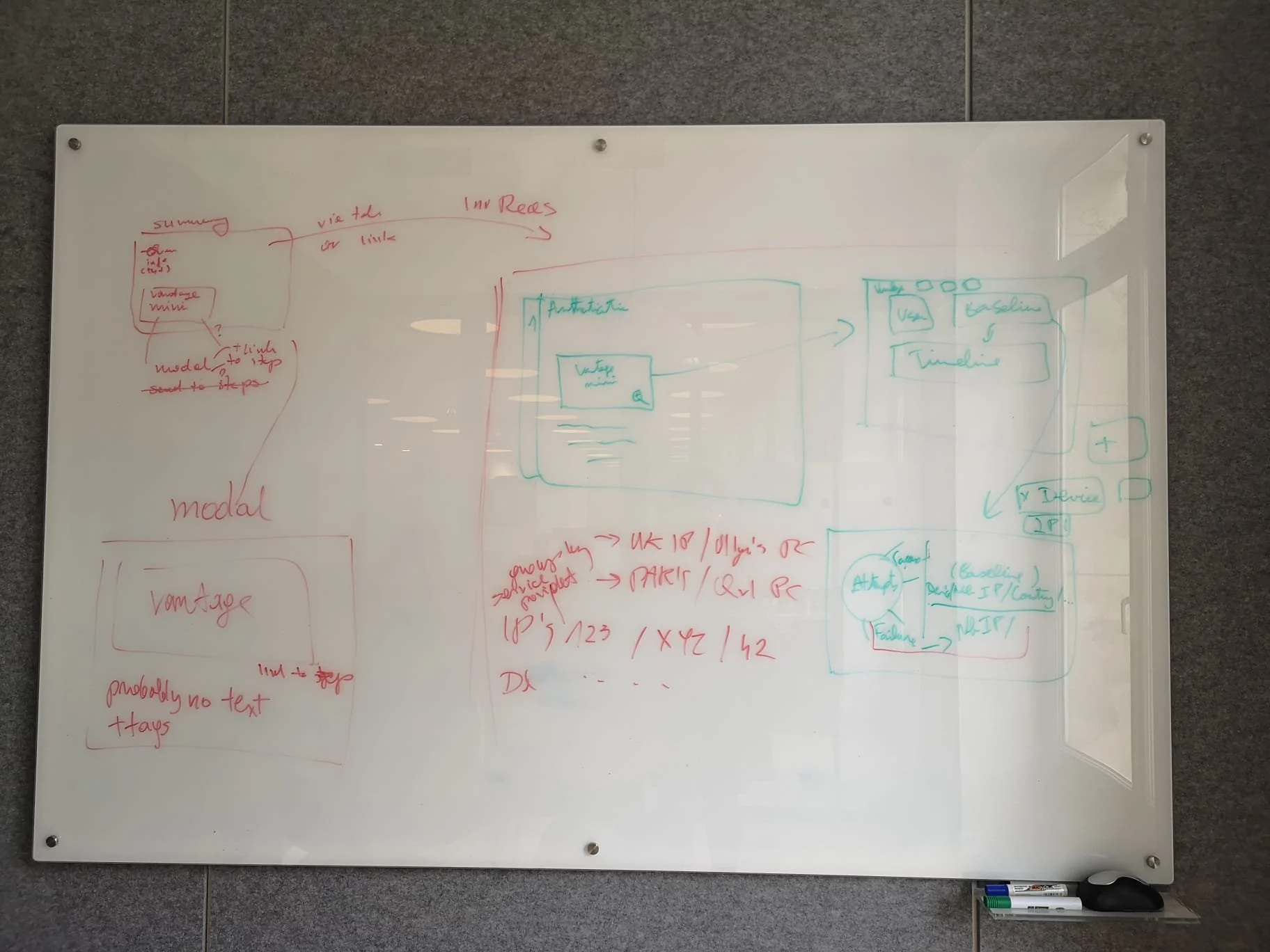
Whiteboard with user flow sketches from the workshop-
I used Granola to transcribe the workshop (with participants’ consent), allowing me to focus fully on facilitating.
Afterwards, I fed the transcript into Claude and, using carefully crafted prompts, analysed the findings to produce a structured summary supported by quotes and sources.
Time saved: ~3 hours.
Workshop outcomes
Deliverables
I kept the deliverables focused on what was most useful. Ideas for more robust solutions were captured as Jobs to Be Done and carried forward into the next iteration.
Reusable outputs
User journey
Three main SOC analyst personas (see below)
MVP
Jobs to be done
MVP user flow & main screen sketch
Next steps
Jobs to be done for the next iteration (NDA)
The key insight
The workshop revealed that SOC analysts don't investigate suspicious logins in the same way. Their behaviour changes depending on the severity of the incident, time pressure, and what they need to accomplish. We identified three main behaviour types:

🔵 Quick Reader
“Is this real? Do I need to act?”
Needs: A trustworthy verdict and an immediate indication of whether action is required.
Gets frustrated by: Having to scroll, dig through context, or navigate deeper to find the verdict.

🟡 Deep Investigator
“What exactly happened, and can I prove it?”
Needs: A clear evidence trail - baseline vs. anomaly, specific signals, and the ability to extract information for reporting.
Gets frustrated by: Information that can't be extracted, overly summarised reasoning, or having to reconstruct the story themselves.

🔴 Skeptical Analyst
“I don't trust the verdict until I've verified it myself.”
Needs: Access to the underlying signals and reasoning so they can independently validate or challenge the verdict.
Gets frustrated by: Black-box verdicts, buried signals, or no clear way to override the system.
These three behaviours became the foundation for the improved solution.
Final design
Key improvements
Vantage is now how Qevlar AI knows what’s normal for every user when it comes to logins.
Instead of all-time summary, we opted for an user behavioral baseline, built from last 30 days of signals. It doesn’t stand alone, but it’s plugged into every Qevlar investigation, so that verdicts are grounded in user environment. Sudden deviations from that baseline become evident.
Before:
Previous version was seriously lacking:
data with no investigation value (total number of successful vs failed logins, number of unique IPs)
no comparative with the user’s baseline
no verdict suggestion
timeline displayed in a messy way
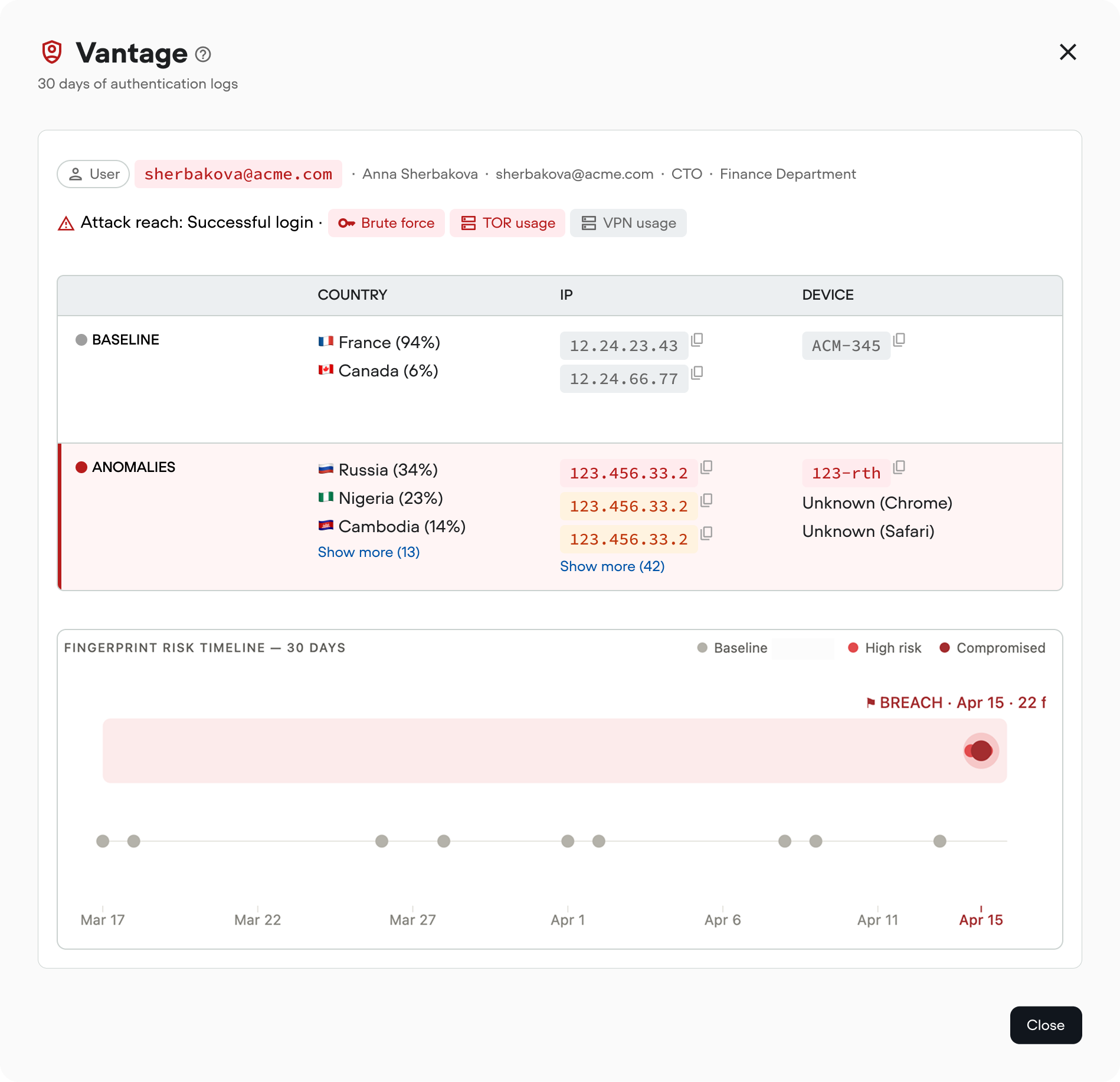
After:
To make sure, that this time investigators have all the information they need to assess security alerts, I decided to surface and compare (baseline vs anomaly):
Geography & IP - country, ASN, residential proxy patterns, impossible travel…
Device & session - TLS fingerprint, managed vs. unmanaged, new device…
Working hours - sign-ins outside the user’s usual Mon–Fri/time-zone window
Rate & patterns - spray detection, MFA fatigue, failure-to-success ratio shifts
I also made sure we clearly suggest a verdict to the SOC analyst, and for those who wish to do so, we provide access to readable timeline and raw data.
Main view details
In the main window, everything is visible at a glance:

Verdict & reach
Every anomaly gets a verdict and a reach score, so analysts can instantly see whether the attacker got in, gained partial access, or was blocked.
Important for: 🔵 Quick Reader
Need: A trustworthy verdict and an immediate indication of whether action is required.
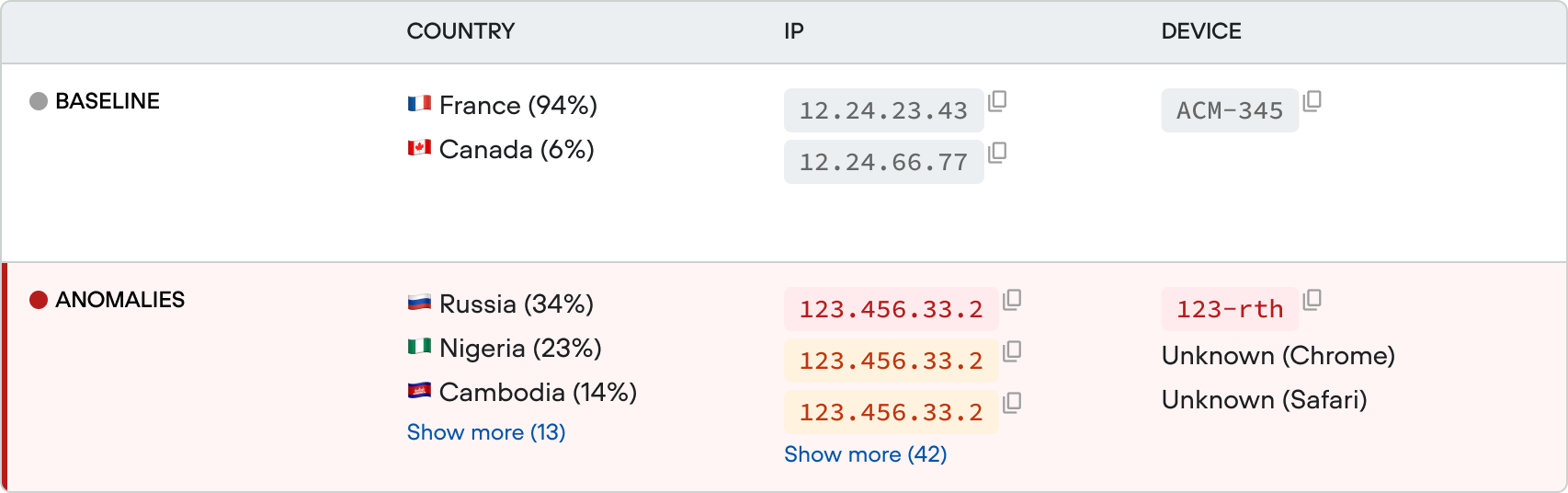
Baseline vs. observed, side by side
Country, device, IP, IP range, working hours - changes are visible without digging through logs. Every flag also links to the raw events.
Important for: 🟡 Deep Investigator
Needs: A clear evidence trail - baseline vs. anomaly, specific signals, and the ability to extract information for reporting.
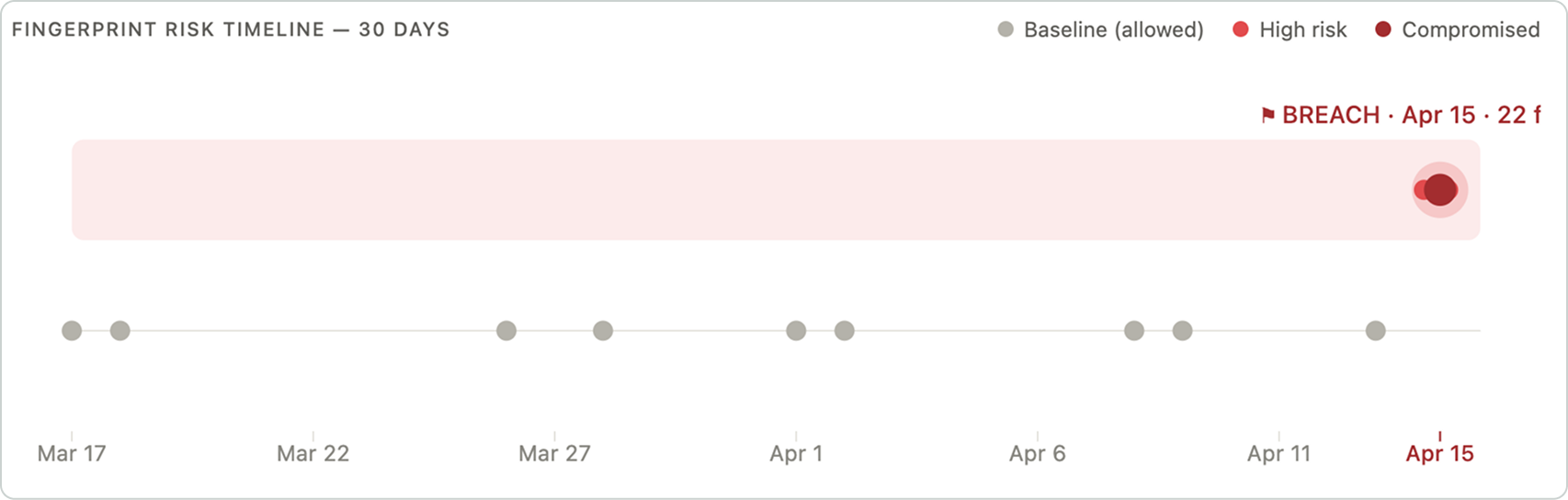
Timeline to visually explain what happened and when
Every Vantage card ends with a timeline showing the user’s login activity over the previous 30 days, helping analysts quickly identify patterns, anomalies, and when the problem occurred.
Important for: 🔴 Skeptical Analyst
Need: Access to the underlying signals and reasoning so they can independently validate or challenge the verdict.
Testimonials
“I came to Olga with an idea for Vantage and a rough mockup I generated with Claude. She ran a design workshop that made us rethink the whole problem, and we understood who the users actually were and what they needed to see quickly.
Thanks to that, it became clear that the initial concept was surfacing information analysts didn't need, and missing what they actually did. We shipped something much better than what I started with.
The handoff was also very good: annotated Figma, a written spec, every decision was documented. The engineers had no questions.”

- Hugo Ducrocq, Product Manager at Qevlar AI